Tech Corner
Laptop Screen Extender, DualView 14” 1080P FHD
Laptop Screen Extender, DualView 14” 1080P FHD
Couldn't load pickup availability
Turn your laptop into a portable triple-screen workstation.
A dual 14” Full HD laptop monitor extender designed for focused work, multitasking, remote working, trading, coding, meetings and productivity on the go.
Key Benefits
- Dual 14” portable monitor setup
- Creates a triple-screen laptop workstation
- 1080P Full HD IPS display
- Compatible with 11.6”–15.6” laptops
- Supports Mac, Windows and ChromeOS
- One-cable USB-C connection where supported
- Extended, mirror, collaboration and second-screen modes
- 0–360° rotation for flexible viewing
- Built-in kickstand for stable setup
- Low blue light mode for longer work sessions
- Ideal for remote workers, entrepreneurs, analysts, creators, coders and students
Product Description
Work smarter wherever you open your laptop with the DualView 14” Laptop Screen Extender — a premium dual-screen portable monitor system designed to turn your laptop into a more powerful, flexible and productive workspace.
Instead of constantly switching between tabs, documents, dashboards, video calls and browsers, you can spread your work across multiple screens and stay focused for longer. Use one screen for your main task, another for notes or research, and another for calls, data, emails or project tools.
With dual 14” Full HD IPS screens, wide viewing angles, low blue light support and flexible display modes, this screen extender is ideal for professionals who need more screen space without being tied to a permanent desk setup.
Perfect for home offices, coworking spaces, business travel, client meetings, coding, trading, studying, content creation and productivity-heavy workdays.
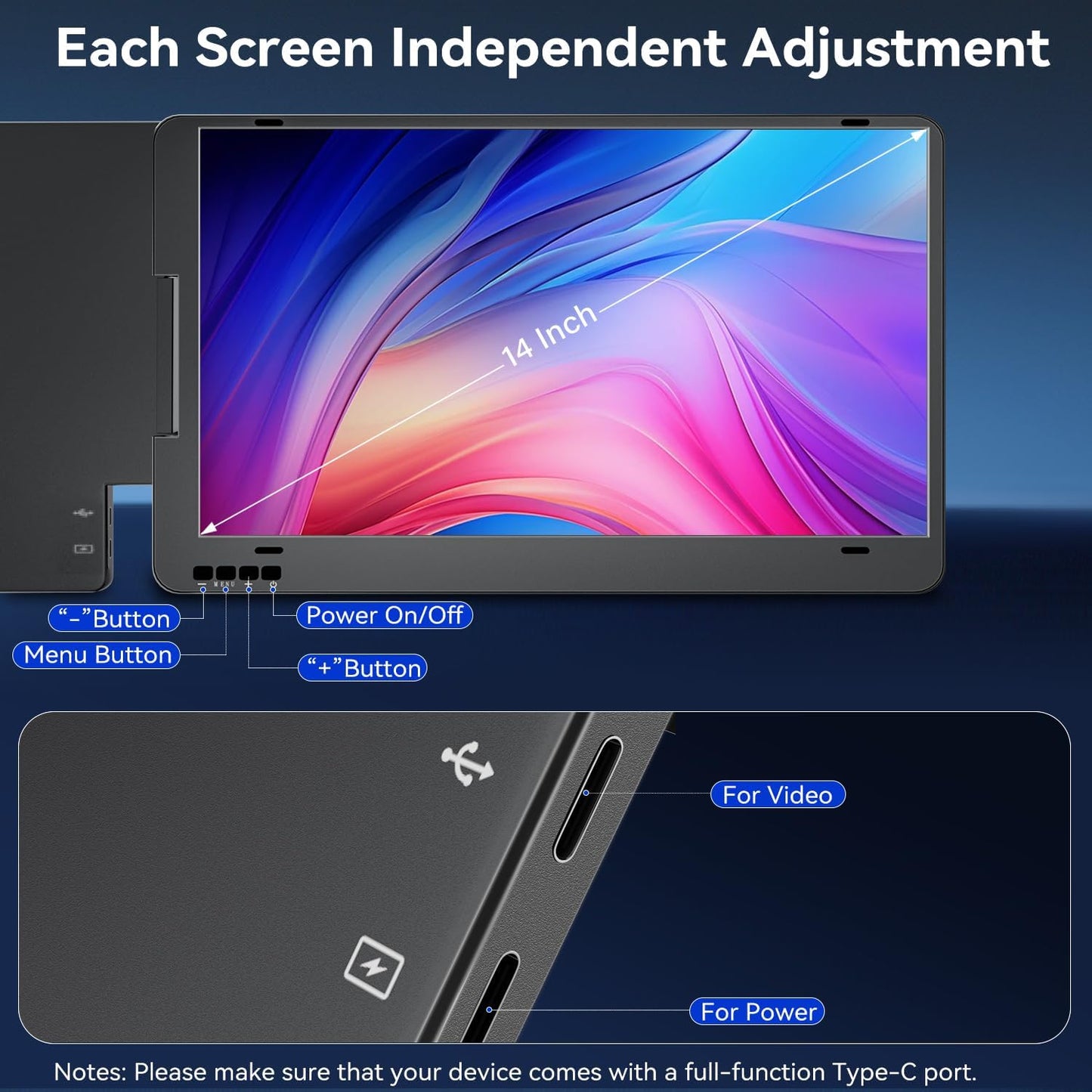
Important compatibility note: before purchasing, measure your laptop and check your ports. The current product page states that it is compatible with laptops up to 13.4” wide or 11.6”–15.6” diagonal, and your USB-C or USB-A port must support video output. Driver installation may be required in some setups.
Why You’ll Love It
More screen space. Less tab switching. Better focus.
This laptop screen extender is designed for people who work across multiple tools, windows and conversations every day.
Use it to keep your video call open while presenting, compare documents side by side, monitor dashboards, write while researching, code with documentation open, or manage emails while staying focused on your main task.
It brings the feeling of a desktop workstation into a portable, travel-friendly setup.
Key Features
Dual 14” Full HD Screens
Two additional 14” displays give you more workspace for multitasking, research, meetings, dashboards, editing and productivity.
Triple-Screen Laptop Setup
Extend your laptop into a multi-screen workstation, helping reduce constant tab switching and making complex work easier to manage.
IPS Display with Wide Viewing Angles
The IPS panel provides clear visuals and wide viewing angles, making it practical for work, collaboration and presentations.
1080P Visual Clarity
The 1080×1920 resolution helps keep documents, dashboards, websites and creative work sharp and easy to read.
Flexible Display Modes
Use extended mode, mirror mode, collaboration mode or second-screen mode depending on how you want to work.
0–360° Rotation
The screens can rotate for different viewing angles, making it easier to share content in meetings or adjust your setup to your workspace.
Built-In Kickstand
The built-in kickstand helps support the screens securely without needing extra desk accessories.
Low Blue Light Support
Low blue light mode helps make longer work sessions more comfortable, especially when working for extended periods.
Portable Productivity Design
Designed for people who work from different locations, including home offices, coworking spaces, hotels, cafés, client sites and shared workspaces.
Perfect For
- Remote workers
- Entrepreneurs
- Business owners
- Data analysts
- Traders
- Coders
- Designers
- Content creators
- Students
- Project managers
- Consultants
- Digital nomads
- Online meetings
- Research and writing
- Dashboard monitoring
- Client presentations
- Work-from-anywhere setups
Product Details
| Feature | Details |
|---|---|
| Product Type | Dual laptop screen extender |
| Screen Size | Dual 14” portable monitors |
| Resolution | 1080×1920 Full HD |
| Panel Type | IPS |
| Brightness | 350 nits |
| Contrast Ratio | 1000:1 |
| Colour Gamut | 72% NTSC / 100% sRGB listed on product page |
| Viewing Angle | Up to 178° |
| Modes | Extended, mirror, collaboration and second-screen modes |
| Rotation | 0–360° |
| Stand | Built-in kickstand |
| Compatibility | Mac, Windows and ChromeOS |
| Laptop Size | 11.6”–15.6” diagonal / up to 13.4” wide |
| Best For | Productivity, remote work, meetings, coding, trading and multitasking |
Compatibility Notes
Please check before purchasing:
- Measure your laptop width and screen size
- Compatible with laptops up to 13.4” wide or 11.6”–15.6” diagonal
- Your laptop port must support video output
- USB-C connection is supported where your device allows video output
- USB-A connection may require driver installation
- Compatibility may vary depending on laptop model, operating system and port specifications
This is important to reduce returns and make the page feel more trustworthy.
What’s Included
- 1 × Dual 14” Laptop Screen Extender
- USB-C to USB-C cable
- USB-A converter head
- User instructions
- Protective packaging
FAQ
Will this work with my laptop?
It is designed for laptops between 11.6” and 15.6”, but you should measure your laptop before buying. The current product page says the X90A is compatible with laptops up to 13.4” wide.
Does it work with Mac?
Yes. The product page lists support for macOS, including M1, M2 and M3 Mac models.
Does it work with Windows?
Yes. It supports Windows laptops, provided the device ports support video output.
Does it work with ChromeOS?
Yes. ChromeOS support is listed on the current product page.
Do I need one cable or multiple cables?
The product page highlights one-cable USB-C connection where supported. Some setups may require the USB-A converter head or driver installation depending on your laptop.
Can I use it for meetings?
Yes. The rotating screens and display modes make it useful for video calls, presentations, collaboration and screen sharing.
Can the screens rotate?
Yes. The screens support 0–360° rotation for flexible viewing and sharing.
Is it good for working from home?
Yes. It is ideal for home offices, remote work, productivity, dashboards, emails, research, writing and multitasking.
Is it portable?
Yes. It is designed as a portable monitor extender, making it suitable for travel, coworking spaces, client visits and flexible work setups.
Delivery & Returns
- UK delivery available
- Secure checkout
- 30-day returns
- Customer support available
- Payment options available at checkout